AngularJS中使用百度地图
前言
AngularJS 作为一个成功的框架,营造出了完备的生态系统。尤其 Directive ,对于组件化起了非常大的作用。很多时候,如我这般懒人,网上搜一搜,就找到一个合用的 Directive ,省了自己诸多麻烦。今天就简单介绍一下我的一个懒人组件 - 百度地图。
效果图是这样的:
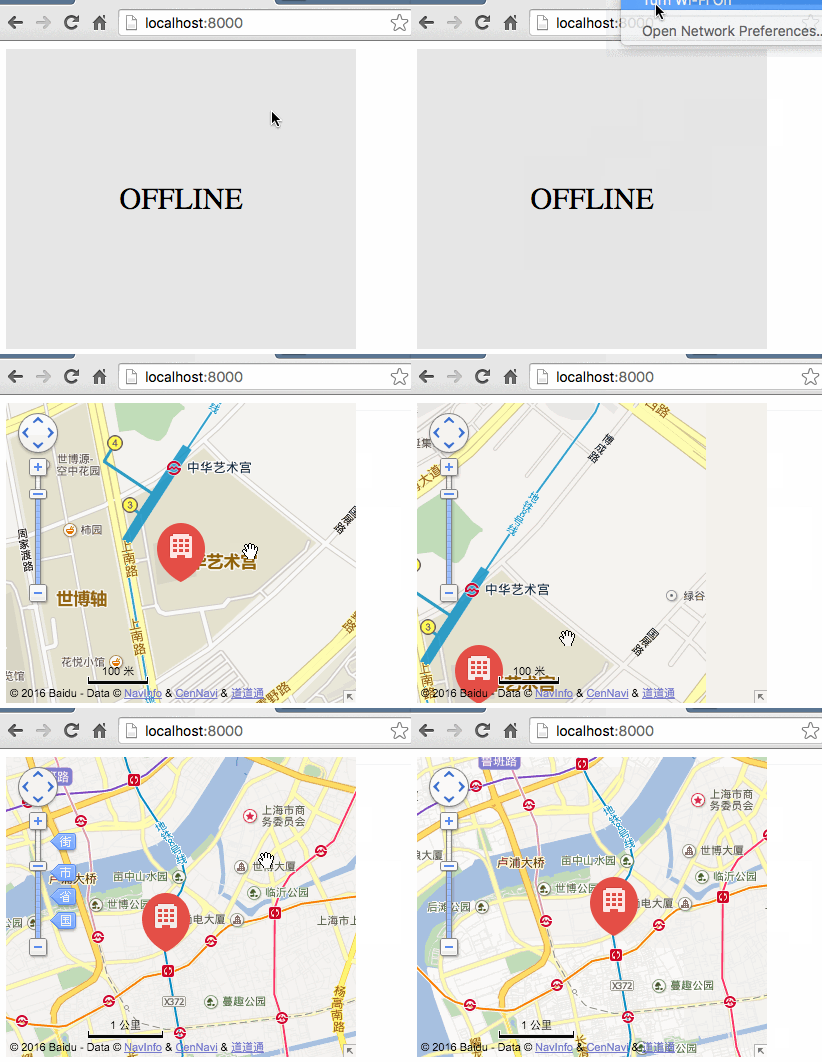
注:本章介绍的是 AngularJS 的百度地图指令组件,如果需要 angular2 支持的,请看这里 angular2-baidu-map
安装
最low式
直接 下载 使用,为什么这种方式low,因为三方库不用个什么包管理工具,还随着自己的项目源码提交,浪费空间就算了,也丢了版本追踪的能力...吧啦吧啦吧啦
推荐式
npm install angular-baidu-map --save 有人问为什么不提供 bower 支持,那我建议你真该多逛逛社区了, bower 已是明日黄花,诸多缺陷已经跟不上时代的节奏,更何况人人都用 node ,用自带的 npm 管理不是更省心么?(其实 angular-baidu-map@2.0.0 之前的版本也是支持 bower 的)
引入资源
最牛ES2015式
import {ngBaiduMap} from 'angular-baidu-map';普通CommonJS式
var ngBaiduMap = require('angular-baidu-map').ngBaiduMap;低调script直戳式
<script type="text/javascript" src="node_modules/angular/angular.min.js"></script> <script type="text/javascript" src="node_modules/angular-baidu-map/dist/angular-baidu-map.js"></script> <script type="text/javascript"> var ngBaiduMap = window.ngBaiduMap; </script> 直戳式之所以写的多是因为需要手动显示指定 AngularJS 在 angular-baidu-map.min.js 之前加载
用法
作为迈向 AngularJS 的第一步,我们需要声明对 angular-baidu-map 的依赖:
//这里ngBaiduMap是上面得到的变量 var app = angular.module('app', [ngBaiduMap]); 然后找到 html 或者 template ,挑选一处希望显示地图的位置,放置如下 Directive :
<baidu-map options="mapOptions" ak="<your-ak>" offline="offlineOpts" class="<style-for-it>"></baidu-map>-
mapOptions表达式,用来描述地图本身。后面详细介绍该对象参数 -
ak字符串,是你在 百度开放平台 申请的AppKey,没有这个,你的地图显示不出来的 -
offlineOpts表达式,用来控制离线后的友好支持,后面详细介绍各参数。 -
class或者style必须为baidu-map标签指定一个样式(宽、高必须),否则地图没了形状,显示不出来
简单示例
写一个DemoController
app.controller('DemoController', ['$scope', function($scope) { //离线友好支持 $scope.offlineOpts = { //无网络时,没10秒重试一次,看能否刷出地图 retryInterval: 10000, //无网络时显示的文字 txt: 'Offline Mode' }; //地图显示中心经纬度 var longitude = 121.506191; var latitude = 31.245554; $scope.mapOptions = { center: { longitude: longitude, latitude: latitude }, zoom: 17,//缩放级别 //显示一个标记 markers: [{ //标记坐标 longitude: longitude, latitude: latitude, //标记图片 icon: 'img/mappiont.png', //标记大小 width: 49, height: 60, //点击标记后的提示框标题 title: 'Where', //点击标记后的提示框内容 content: 'Put description here' }] }; } ]); mapOptions 详解
| Attribute | Type | Required | Description | Example |
|---|---|---|---|---|
| options.center.longitude | number | 是 | 地图中心点经度 | 121.506191 |
| options.center.latitude | number | 是 | 地图中心点纬度 | 31.245554 |
| options.zoom | number | 是 | 地图缩放级别,取值范围3 ~ 19 | 9 |
| options.navCtrl | boolean | 否 | 是否显示地图导航控制条,默认显示 | false |
| options.scaleCtrl | boolean | 否 | 是否显示地图比例尺,默认显示 | false |
| options.overviewCtrl | boolean | 否 | 是否显示缩略图,默认显示(在地图右下角) | false |
| options.enableScrollWheelZoom | boolean | 否 | 是否开启鼠标滚轮调整地图缩放级别,默认开启 | false |
| options.markers | array | 否 | 地图标注 | [{longitude: longitude,latitude: latitude,icon: 'img/mappiont.png',width: 49,height: 60,title: 'Where',content: 'Put description here'}] |
| marker.longitude | number | 是 | 标注经度 | 121.506191 |
| marker.latitude | number | 是 | 标注纬度 | 31.245554 |
| marker.icon | string | 否 | 标注自定义图标URL | 'img/mappiont.png' |
| marker.width | number | 否 | 标注图片宽度 | 40 |
| marker.height | number | 否 | 标注图片高度 | 60 |
| marker.title | string | 否 | 点击标注显示的信息窗口里的标题 | 'hello' |
| marker.content | string | 否 | 点击标注显示的信息窗口里的内容 | 'hello world' |
| marker.enableMessage | boolean | 否 | 是否开启短信发送功能,默认关闭 | true |
offlineOpts 详解
| Attribute | Type | Required | Description | Example |
|---|---|---|---|---|
| offline.retryInterval | number | 否 | 无网络时重试间隔,默认30000浩渺 | 5000 |
| offline.txt | string | 否 | 无网络时显示的字符,默认"OFFLINE" | OFFLINE MODE |
这里有一个线上演示: github
正文到此结束
热门推荐




相关文章



Loading...
![[HBLOG]公众号](https://www.harries.blog/img/qrcode_gzh.jpg)