Channels in Go
Go的Goroutine能够让我们并行的运行一些代码。但是要有效的利用它,需要一些额外的工作。 当进程 完成 创建 , 我们 应该 能够 将 数据 传递 到 正在运行 的 进程 , 我们也 应该 能够 获取 数据 从 正在运行 的 进程 ,channels 做到了这一点并且能够很好的与goroutines工作。
我们可以把Channel想象成 一个 通道 管 或 定义 的 大小 和 容量 的传输带,一边可以往管道上面存放东西,另外一边可以将其取出
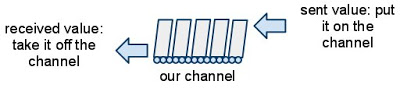
Channels用来同步并发执行的函数并提供它们某种传值交流的机制。Channels的一些特性:通过channel传递的元素类型、容器(或缓冲区)和传递的方向由“<-”操作符指定。你可以使用内置函数 make 分配一个channel:
i := make(chanint) // by default the capacity is 0 s := make(chanstring, 3) // non-zero capacity r := make(<-chanbool) // can only read from w := make(chan<- []os.FileInfo) // can only write to
我们可以通过<- 操作符 发送 或 接收 的 数据
my_channel := make(chanint) //within some goroutine - to put a value on the channel my_channel <- 5 //within some other goroutine - to take a value off the channel var my_recvd_valueint my_recvd_value = <- my_channel
ic_send_only := make (<-chanint) //a channel that can only send data - arrow going out is sending ic_recv_only := make (chan<- int) //a channel that can only receive a data - arrow going in is receiving
查看一个完整的示例:
package main import ( "fmt" "time" "strconv" ) var i int funcmakeCakeAndSend(cschanstring) { i = i + 1 cakeName := "Strawberry Cake " + strconv.Itoa(i) fmt.Println("Making a cake and sending ...", cakeName) cs <- cakeName //send a strawberry cake } funcreceiveCakeAndPack(cschanstring) { s := <-cs //get whatever cake is on the channel fmt.Println("Packing received cake: ", s) } funcmain() { cs := make(chanstring) for i := 0; i<3; i++ { gomakeCakeAndSend(cs) goreceiveCakeAndPack(cs) //sleep for a while so that the program doesn’t exit immediately and output is clear for illustration time.Sleep(1 * 1e9) } } 输出的结果:
Making a cakeand sending ... StrawberryCake 1 Packingreceivedcake: StrawberryCake 1 Making a cakeand sending ... StrawberryCake 2 Packingreceivedcake: StrawberryCake 2 Making a cakeand sending ... StrawberryCake 3 Packingreceivedcake: StrawberryCake 3
其实并不建议将goroutine放在 for 循环中
package main import ( "fmt" "time" "strconv" ) funcmakeCakeAndSend(cschanstring) { for i := 1; i<=3; i++ { cakeName := "Strawberry Cake " + strconv.Itoa(i) fmt.Println("Making a cake and sending ...", cakeName) cs <- cakeName //send a strawberry cake } } funcreceiveCakeAndPack(cschanstring) { for i := 1; i<=3; i++ { s := <-cs //get whatever cake is on the channel fmt.Println("Packing received cake: ", s) } } funcmain() { cs := make(chanstring) gomakeCakeAndSend(cs) goreceiveCakeAndPack(cs) //sleep for a while so that the program doesn’t exit immediately time.Sleep(4 * 1e9) } 对比上面的输出结果:
Making a cakeand sending ... StrawberryCake 1 Making a cakeand sending ... StrawberryCake 2 Packingreceivedcake: StrawberryCake 1 Packingreceivedcake: StrawberryCake 2 Making a cakeand sending ... StrawberryCake 3 Packingreceivedcake: StrawberryCake 3
缓冲
为了避免存在一个channel的缓冲区所有读取操作都在没有锁定的情况下顺利完成(如果缓冲区是空的)并且写入操作也顺利结束(缓冲区不满),这样的channel被称作非同步的channel。下面是一个用来描述这两者区别的例子:
funcmain() { message := make(chanstring) count := 3 gofunc() { for i := 1; i <= count; i++ { fmt.Println("send message") message <- fmt.Sprintf("message %d", i) } }() time.Sleep(time.Second * 3) for i := 1; i <= count; i++ { fmt.Println(<-message) } } sendmessage // waite 3 second message 1 sendmessage sendmessage message 2 message 3
现在我们提供一个缓冲区给输出信息的channel,例如:定义初始化行将被改为:message := make(chan string, 2)。这次程序输出将变为:
funcmain() { message := make(chanstring,2) count := 3 gofunc() { for i := 1; i <= count; i++ { fmt.Println("send message") message <- fmt.Sprintf("message %d", i) } }() time.Sleep(time.Second * 3) for i := 1; i <= count; i++ { fmt.Println(<-message) } } sendmessage sendmessage sendmessage // wait 3 second message 1 message 2 message 3
这里我们看到所有的写操作的执行都不会等待第一次对缓冲区的读取操作结束,channel允许储存所有的三条信息。通过修改channel容器,我们通过可以控制处理信息的总数达到限制系统输出的目的。
死锁
funcmain() { c := make(chanint) c <- 42 // write channel val := <-c // read channel println(val) } 我们会看到编译器报错:
fatalerror: allgoroutinesareasleep - deadlock! goroutine 1 [chansend]:
这个错误就是我们所知的 死锁 . 在这种情况下,两个goroutine互相等待对方释放资源,造成双方都无法继续运行。GO语言可以在运行时检测这种死锁并报错。这个错误是因为锁的自身特性产生的。
代码在次以单线程的方式运行,逐行运行。向channel写入的操作(c <- 42)会锁住整个程序的执行进程,因为在同步channel中的写操作只有在读取器准备就绪后才能成功执行。然而在这里,我们在写操作的下一行才创建了读取器。
为了使程序顺利执行,我们需要做如下改动:
funcmain() { c := make(chanint) gofunc() { c <- 42 }() val := <-c println(val) } 运行上面代码 就可以看到正常输出42了。
参考文献: http://golangtutorials.blogspot.hk/2011/06/channels-in-go.html
Channels in Go
正文到此结束
热门推荐





相关文章



Loading...
![[HBLOG]公众号](https://www.harries.blog/img/qrcode_gzh.jpg)