Java 多线程下篇 线程通讯
等待/通知机制
利用wait,notify实现的一个生产者、一个消费者和一个单位的缓存的简单模型:
public class QueueBuffer {
    int n;
    boolean valueSet = false;

    synchronized int get() {
        if (!valueSet)
            try {
                wait();
            } catch (InterruptedException e) {
                System.out.println("InterruptedException caught");
            }
        System.out.println("Got: " + n);
        valueSet = false;
        notify();
        return n;
    }

    synchronized void put(int n) {
        if (valueSet)
            try {
                wait();
            } catch (InterruptedException e) {
                System.out.println("InterruptedException caught");
            }
        this.n = n;
        valueSet = true;
        System.out.println("Put: " + n);
        notify();
    }
}
public class Producer implements Runnable {

    private QueueBuffer q;

    Producer(QueueBuffer q) {
        this.q = q;
        new Thread(this, "Producer").start();
    }

    public void run() {
        int i = 0;
        while (true) {
            q.put(i++);
        }
    }

}
public class Consumer implements Runnable {

    private QueueBuffer q;

    Consumer(QueueBuffer q) {
        this.q = q;
        new Thread(this, "Consumer").start();
    }

    public void run() {
        while (true) {
            q.get();
        }
    }

}
public class Main {

    public static void main(String[] args) {
        QueueBuffer q = new QueueBuffer();
        new Producer(q);
        new Consumer(q);
        System.out.println("Press Control-C to stop.");
    }

}
上面例子中, 我们生产了一个数据后就需要对这个数据进行消费. 如果生产了但数据没有被获取, 则生产线程会在等待中. 直到调用了 notify() 方法后才会被继续执行. 反之也是一样的.
也就是说, wait() 方法是使线程暂停; notify() 方法是使线程继续运行.
但是在使用时需要注意:
1.执行wait, notify时,不获得锁会如何?
public static void main(String[] args) throws InterruptedException {
        Object obj = new Object();
        obj.wait();
        obj.notifyAll();
}
执行以上代码, 会抛出java.lang.IllegalMonitorStateException的异常.
2.执行wait, notify时, 不获得 该对象的锁 会如何?
public static void main(String[] args) throws InterruptedException {
        Object obj = new Object();
        Object lock = new Object();
        synchronized (lock) {
            obj.wait();
            obj.notifyAll();
        }
    }
执行代码,同样会抛出java.lang.IllegalMonitorStateException的异常
该对象的锁指的就是 obj 对象的锁.
3.为什么在执行 wait , notify 时, 必须获得 该对象的锁 ?
我们需要先知道 synchronized 的作用:
synchronized
synchronized
synchronized
当一个线程在执行 synchronized 的方法内部, 调用了 wait() 后, 该线程会释放该对象的锁, 然后该线程会被添加到该对象的等待队列中(waiting queue), 只要该线程在等待队列中, 就会一直处于闲置状态, 不会被调度执行.
要注意 wait() 方法会强迫线程先进行释放锁操作, 所以在调用 wait() 时, 该线程必须已经获得锁, 否则会抛出异常( IllegalMonitorStateException ). 由于 wait() 在 synchonized 的方法内部被执行, 锁一定已经获得, 就不会抛出异常了.
当一个线程调用一个对象的 notify() 方法时, 调度器会从所有处于该对象等待队列 (waiting queue) 的线程中取出任意一个线程, 将其添加到入口队列 (entry queue) 中. 然后在入口队列中的多个线程就会竞争对象的锁, 得到锁的线程就可以继续执行. 如果等待队列中(waiting queue)没有线程, notify() 方法不会产生任何作用.
线程状态
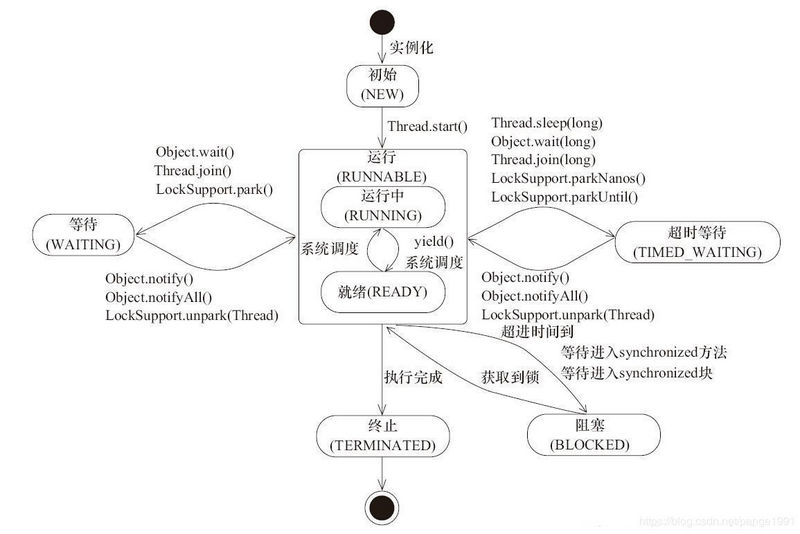
- NEW: 线程实例化时的默认状态.
- RUNNABLE: 一旦线程开始执行, 它就会移动到Runnable状态. 请注意, 等待获取 CPU 以供执行的线程仍处于此状态.
-
BLOCKED: 线程一旦被阻塞, 就会等待监视器锁, 并且移动到阻塞状态. 有两种方式可以进入阻塞状态.
Object.Wait
-
WAITING: 调用下列方法来将线程变为等待状态
- Object.wait without a timeout
- Thread.join without a timeout
- LockSupport.park
-
TIMED_WAITING: 调用下列方法将线程变为超时等待
- Thread.sleep
- Object.wait with a timeout
- Thread.join with a timeout
- LockSupport.parkNanos
- LockSupport.parkUntil
- TERMINATED: 一旦线程终止, 它就会移动到这种状态.
通过管道进行线程通信: 字节流
用来读取管道中的数据
public class ReadData extends Thread {

    private PipedInputStream pipedInputStream;

    public ReadData(PipedInputStream pipedInputStream) {
        this.pipedInputStream = pipedInputStream;
    }

    @Override
    public void run() {
        try {
            System.out.println("read :");
            byte[] byteArray = new byte[20];
            int readLen = this.pipedInputStream.read(byteArray);
            String newData = "";
            while(readLen != -1) {
                newData += new String(byteArray, 0, readLen);
                readLen = this.pipedInputStream.read(byteArray);

            }

            System.out.println(newData);
        } catch (Exception e) {
            e.printStackTrace();
        }
    }

}
用来给管道发送数据
public class WriteData extends Thread {

    private PipedOutputStream pipedOutputStream;

    public WriteData(PipedOutputStream pipedOutputStream) {
        this.pipedOutputStream = pipedOutputStream;
    }

    @Override
    public void run() {
        try {
            System.out.println("write :");
            for (int i = 0; i < 300; i++) {
                String outData = "" + (i + 1);
                this.pipedOutputStream.write(outData.getBytes());
                System.out.print(outData);
            }
            System.out.println();
            this.pipedOutputStream.close();
        } catch (Exception e) {
            e.printStackTrace();
        }
    }

}
public static void main(String[] args) throws IOException {

        PipedInputStream pipedInputStream = new PipedInputStream();
        PipedOutputStream pipedOutputStream = new PipedOutputStream();

        pipedOutputStream.connect(pipedInputStream);

        WriteData writeData = new WriteData(pipedOutputStream);
        ReadData readData = new ReadData(pipedInputStream);

        writeData.start();
        readData.start();

    }
pipedOutputStream.connect(pipedInputStream); 用来将两个流之间产生通讯.
对于字节流和字符流是一样的, 只需要使用 PipedWriter 和 PipedReader .
join 方法使用
在一个线程(父线程)中创建另一个线程(子线程), 有些情况下, 我们需要等待子线程执行完成后, 父线程在继续执行.
比如子线程处理一个数据, 父线程要取得这个数据中的值, 可以考虑使用 join 方法来实现.
不使用 join 方法前的问题
public class MyThread extends Thread {
    @Override
    public void run() {
        int i = (int) (Math.random() * 10000);
        System.out.println(i);
        try {
            Thread.sleep(i);
        } catch (InterruptedException e) {
            e.printStackTrace();
        }
    }
}
public static void main(String[] args) throws IOException {

        MyThread myThread = new MyThread();
        myThread.start();

        //Thread.sleep(?);

        System.out.println("我想当 myThread 执行完毕后再执行");
        System.out.println("但上面代码中 sleep 中的值应该写多少?");
        System.out.println("答案是: 值不能确定 :) ");
    }
使用 join 方法来解决问题
public static void main(String[] args) throws IOException, InterruptedException {

        MyThread myThread = new MyThread();
        myThread.start();
        myThread.join();

        System.out.println("我想当 myThread 对象执行完毕后我再执行, 我做到了");
    }
join 与 synchronized 的区别是: join 在内部使用 wait 方法进行等待, 而 synchronized 关键字使用的是 "对象监视器" 原理做完同步.
join(long) 方法的使用
方法 join(long) 中的参数是设置等待的时间.
public class MyThread extends Thread {
    @Override
    public void run() {
        try {
            Thread.sleep(5000);
            System.out.println("执行完成");
        } catch (InterruptedException e) {
            e.printStackTrace();
        }
    }
}
public static void main(String[] args) throws IOException, InterruptedException {

    MyThread myThread = new MyThread();
    myThread.start();
    myThread.join(2000);

    System.out.println("等待2秒后执行");
}
从打印结果来看主线程只等待了两秒后输出了 "等待2秒后执行", 和 sleep 执行结果是一样的. 主要原因还是来自于这2个方法同步的处理上.
方法 join(long) 与 sleep(long) 的区别, join(long) 会释放锁, sleep(long) 不会释放锁.
ThreadLocal 类的使用
变量值的共享可以使用 public static 变量的形式, 所有的线程都使用同一个 public static 变量. 如果想实现每一个线程都有自己的共享变量可以使用 ThreadLocal 类.
类 ThreadLocal 主要解决的就是每个线程绑定自己的值, 可以比喻成全局存放数据的盒子, 盒子中可以存储每个线程的私有数据.
多个线程之间是隔离的.
public class Tools {
    public static ThreadLocal threadLocal = new ThreadLocal();
}
public class ThreadA extends Thread {
    @Override
    public void run() {
        try {
            for (int i = 0; i < 100; i++) {
                Tools.threadLocal.set("ThreadA" + (i + 1));
                System.out.println("ThreadA get Value=" + Tools.threadLocal.get());
                Thread.sleep(200);
            }
        } catch (Exception e) {
            e.printStackTrace();
        }
    }
}
public class ThreadB extends Thread {
    @Override
    public void run() {
        try {
            for (int i = 0; i < 100; i++) {
                Tools.threadLocal.set("ThreadB" + (i + 1));
                System.out.println("ThreadB get Value=" + Tools.threadLocal.get());
                Thread.sleep(200);
            }
        } catch (Exception e) {
            e.printStackTrace();
        }
    }
}
类 InheritableThreadLocal 的使用
使用 InheritableThreadLocal 类可以在子线程中取得父线程继承下来的值.
值继承
public class InheritableThreadLocalEx extends InheritableThreadLocal {
    @Override
    protected Object initialValue() {
        return new Date().getTime();
    }
}
public class Tools {
    public static InheritableThreadLocalEx inheritableThreadLocalEx = new InheritableThreadLocalEx();
}
public class ThreadA extends Thread {
    @Override
    public void run() {
        try {
            for (int i = 0; i < 10; i++) {
                System.out.println("ThreadA get Value=" + Tools.inheritableThreadLocalEx.get());
                Thread.sleep(100);
            }
        } catch (Exception e) {
            e.printStackTrace();
        }
    }
}
public static void main(String[] args) throws IOException, InterruptedException {

    for (int i = 0; i < 10; i++) {
        System.out.println("Main get Value=" + Tools.inheritableThreadLocalEx.get());
        Thread.sleep(100);
    }

    ThreadA threadA = new ThreadA();
    threadA.start();
}
值继承再修改
public class InheritableThreadLocalEx extends InheritableThreadLocal {
    @Override
    protected Object initialValue() {
        return new Date().getTime();
    }

    @Override
    protected Object childValue(Object parentValue) {
        return parentValue + " 我在子线程加的~";
    }
}
注意, 如果子线程在取得值得同, 主线程将 InheritableThreadLocal 中的值进行更改, 那么子线程取到的值还是就值.
正文到此结束
热门推荐






相关文章



Loading...
![[HBLOG]公众号](https://www.harries.blog/img/qrcode_gzh.jpg)