Spring MVC初探
Spring MVC 是基于Model2架构的。关于Model1和Model2架构,可以查看 资料 。在 Spring MVC 中, Action 叫做 Controller 。 Controller 接受参数 request 和 response 。经过处理后返回 ModelAndView 。 Spring MVC 是围绕 DispatcherServlet 设计的。 DispatcherServlet 负责将不同的分发到不同的处理器上。 Spring MVC 还包括处理器映射,视图解析,本地化,主题解析,文件上传等功能。
来看一下 Spring MVC 的工作流程图。
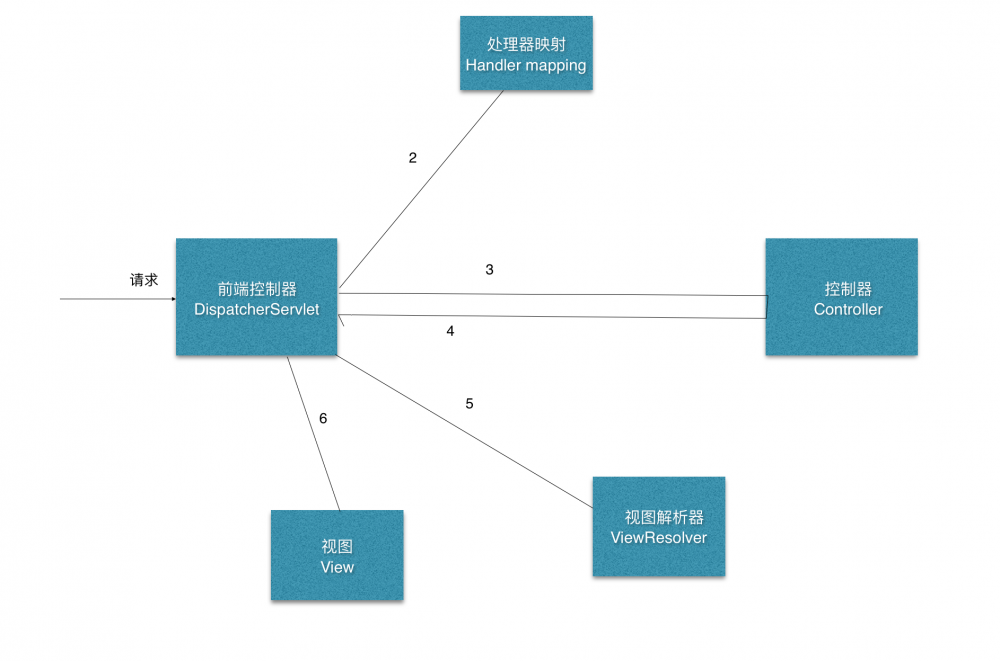
首先 DispatcherServlet 本身其实就是一个 Servlet ,只是对 Servlet 的生命周期进行了改造。来看一看 Spring MVC 的整个处理流程:
- 首先,
Spring MVC接收到一个http请求。 -
DispatcherServlet拿到请求,并在处理器映射中进行查找。 - 查找成功后,发送给控制器。
- 控制器得到结果后,返回
ModelAndView给前端控制器。 - 前端控制器获取到视图模型,发送给视图解析器。
- 最后拿到视图,返回给客户端。
处理器映射
当请求到达 DispatcherServlet 时, DispatcherServlet 可以将请求传递到处理器执行链,根据一系列的拦截,最后找到一条合适的处理器。最常用的处理器映射有两个。包括:
-
BeannNameUrlHandlerMapping。 -
SimpleUrlHandlerMapping
案例
创建项目,导入 Spring MVC 所需要的包,然后再加入tomcat部署环境.
编写Controller
package com.spring3.controller;

import org.springframework.stereotype.Controller;
import org.springframework.ui.ModelMap;
import org.springframework.web.bind.annotation.RequestMapping;
import org.springframework.web.bind.annotation.RequestMethod;

@Controller
@RequestMapping("/welcome")
public classHelloController{

	@RequestMapping(method=RequestMethod.GET)
	publicStringprintWelcome(ModelMap modelMap){
		modelMap.addAttribute("message", "hello world!");
		return "hello";
	}
}
编写 hello.jsp
<%@ page language="java" contentType="text/html; charset=UTF-8"
    pageEncoding="UTF-8"%>
<!DOCTYPE html PUBLIC "-//W3C//DTD HTML 4.01 Transitional//EN" "http://www.w3.org/TR/html4/loose.dtd">
<html>
<head>
<meta http-equiv="Content-Type" content="text/html; charset=UTF-8">
<title>Hello</title>
</head>
<body>
<h1>Spring 3 MVC: ${message}</h1>
</body>
</html>
编写 mvc-dispatcher-servlet
<?xml version="1.0" encoding="UTF-8"?>
<beansxmlns="http://www.springframework.org/schema/beans"
       xmlns:xsi="http://www.w3.org/2001/XMLSchema-instance"
       xmlns:p="http://www.springframework.org/schema/p"
       xmlns:aop="http://www.springframework.org/schema/aop"
       xmlns:context="http://www.springframework.org/schema/context"
       xsi:schemaLocation="http://www.springframework.org/schema/beans
       					   http://www.springframework.org/schema/beans/spring-beans.xsd
       					   http://www.springframework.org/schema/context
       					   http://www.springframework.org/schema/context/spring-context-3.0.xsd">

		<context:component-scanbase-package="com.spring3.controller"/>
		<beanclass="org.springframework.web.servlet.view.InternalResourceViewResolver">
			<propertyname="prefix">
				<value>/WEB-INF/jsp/</value>
			</property>
			<propertyname="suffix">
				<value>.jsp</value>
			</property>
		</bean>
</beans>
编写 web.xml
<?xml version="1.0" encoding="UTF-8"?>
<web-appxmlns:xsi="http://www.w3.org/2001/XMLSchema-instance"
		 xmlns="http://xmlns.jcp.org/xml/ns/javaee"
		 xsi:schemaLocation="http://xmlns.jcp.org/xml/ns/javaee http://xmlns.jcp.org/xml/ns/javaee/web-app_3_1.xsd"
		 id="WebApp_ID" version="3.1">
  <display-name>SpringMVCDemo</display-name>

  <servlet>
    <servlet-name>mvc-dispatcher</servlet-name>
    <servlet-class>org.springframework.web.servlet.DispatcherServlet</servlet-class>
    <load-on-startup>1</load-on-startup>
  </servlet>

  <servlet-mapping>
  	<servlet-name>mvc-dispatcher</servlet-name>
  	<url-pattern>/</url-pattern>
  </servlet-mapping>

  <context-param>
  	<param-name>contextConfigLocation</param-name>
  	<param-value>/WEB-INF/mvc-dispatcher-servlet.xml</param-value>
  </context-param>

  <listener>
  	<listener-class>org.springframework.web.context.ContextLoaderListener</listener-class>
  </listener>
</web-app>
正文到此结束
热门推荐




相关文章



Loading...
![[HBLOG]公众号](https://www.harries.blog/img/qrcode_gzh.jpg)